1. Getting started in Logic X
2. Setting Up Audio I/O
3. Using Audio Tracks and Recording
4. Using Software Instruments and Recording MIDI
5. Using Apple Loops
6. Using the Arpeggiator Plug-in
7. Bouncing a Project
Create your own pro-quality Rock and Metal tracks in minutes with this special dedicated Rock edition of SessionBand – the world’s only chord-based audio loop app.
With over 16,000 stunning, chord-based Rock and Metal audio loops (included) individually recorded by 3 of the world’s top session musicians, SessionBand Rock instantly converts the chords you select into great sounding audio – wherever you are and whatever your ability.
There are 15 different classic UK and US Rock and Metal styles included. Every single loop carefully engineered so you can instantly create your own tracks in those styles: from Rolling Stones and Chili Peppers through Muse, Foo Fighters and Iron Maiden, all the way to Slipknot, Slayer and Magadeth!
For Rock musicians and songwriters, this unique app is the ultimate tool for jamming and writing, with full and complete Rock and Metal tracks just minutes away! It’s also simple enough for non-musicians to create their own great-sounding, copyright-free music.
And with a host of pro features like auto-transpose, automated mixing, one-touch live recording, and Audiobus compatibility – allowing you to seamlessly export our unique content into other top music apps like Garageband – it has never been easier or quicker to create your own studio quality music even if you can’t play a note!
In this tutorial, Mo Volans approaches the popular subject of mastering from a different angle. He’ll show you the bare essentials, not just in plugins, but also in workflow. He’ll take an EDM track that doesn’t have much wrong with it, and quickly get it ready to play in a club or to friends. Note: This is not the advised route if you’re going for a full release through a label.
Output, a Los Angeles based music software company is opening it’s doors Nov 12, 2013 and launching REV – the world’s first collection (and a massive one) of instruments, loops, rises, pads, pulses, swells and more all in REVERSE. Released in partnership w/ Native Instruments, REV is built w/in the Kontakt en- gine and installable through the NI Service Center.
REV offers users the first chance to play instruments in real time in reverse and includes over 1,000+ pre- sets spread over 4 unique engines. All sounds lock to tempo and work within all major DAW’s. Engines include a wide array of filters, stutters and FX that can help the user tweak the sound both in the studio and on the fly. Available from outputsounds.com, REV will be sold as a full collection for $199 and is built for anyone looking to push their sonic envelope – Producers, Composers, Artists, DJs, Sound Designers, etc.
First Look Video:
A few early endorsers include:
David Kahne (Producer of Paul McCartney, Lana Del Rey, Sublime, The Strokes, Kelly Clarkson) Bill Brown (Composer CSI)
Jeff Beal (Composer House Of Cards, Ugly Betty)
Greg Townley (Producer, Mixer: Sideways, Up In The Air)
Jeff Rona (Composer, Lead figure in Building MIDI)
Shortcuts to Songwriting Make Music Fast & EZ – MIDI FX Logic Pro X Tutorial. This video shows how to use Logic Pro’s MIDI effects to create or add musical performances to your songs.
When thousands of loops are installed on your hard disks, finding a particular Apple Loop can be a daunting prospect. Fortunately, you can use a number of key criteria—location, scale, time signature—to restrict your search or browsing results. You can also sort the search results. Here’s a quick overview of the Logic Pro X Apple Loop Browser.
In Logic Pro 9 adding custom icons was a lot easier. However there is a way to do so. First icons are now multi-layer TIFF files instead of single layer PNGs. Second you will have to dig around inside the Logic Pro X App and do some editing.
Below is a video walk though of how I did it, followed by step by step instructions.
First — Right Click on the Logic Pro X app and click on Show Package Contents and follow this path:
1. Make sure you back your application file or at least the MAResourcesMapping.plist file you will be editing. I backed up the whole Resources Folder in the video.
2. Create a TIFF image. It doesn’t have to be a multi-layer TIFF You can convert your old PNGs to TIFFs using preview.
The dimensions of the icons where 128×128 in Logic Pro 9, so that’s what I used here.
3. Open MAResourcesMapping.plist from the Resources folder.
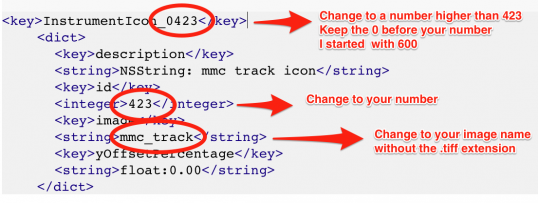
If you scroll down, you’ll see a bunch of strings. Search for this line InstrumentIcon_0423
0423 is the last one in the list.
4. Duplicate (copy and paste) the following code. Once for each image you want to add.
5. Replace the following information for each image your adding.
I started at 0600 to be safe in case they add more icons in an update.
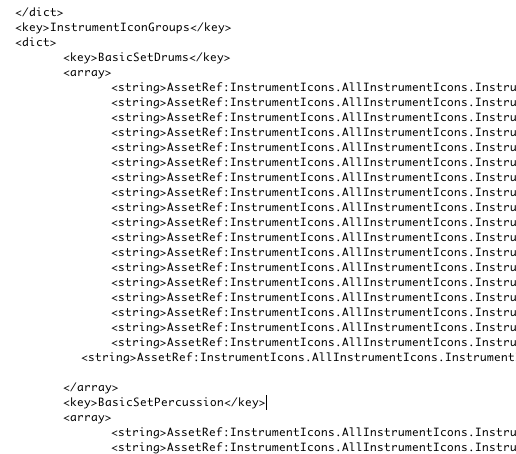
6. Scroll down a bit and you’ll see this code.
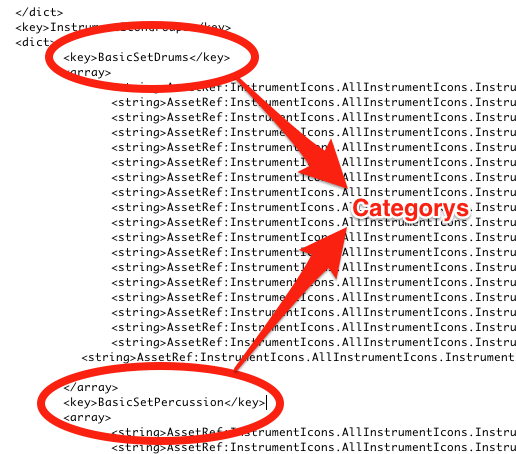
7. Locate the category you want the icon to be in (the code below is for BasicSetDrums & BasicSetPercussion). Duplicate one of the strings, but change the number at the end to your four digit number from above. In my case, using 0600.
8. Save the MAResourcesMapping.plist file.
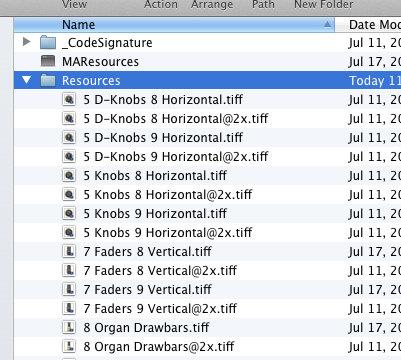
9. Add Your Image files to the Resources folder.
10. Open Logic Pro X and your new icons will be there. You will need to restart Logic if you had the app open while editing.
 Here’s an app for managing GUI ‘themes’ for Logic Pro X.
 Create your own pro-quality Rock and Metal tracks in minutes with this special dedicated Rock edition of SessionBand – the world’s only chord-based audio loop app.
  In this tutorial, Mo Volans approaches the popular subject of mastering from a different angle. He’ll show you the bare essentials, not just in plugins, but also in workflow. He’ll take an EDM track that doesn’t have much wrong with it, and quickly get it ready to play in a club or to friends. Note: This is not the advised route if you’re going for a full release through a label.
 Output, a Los Angeles based music software company is opening it’s doors Nov 12, 2013 and launching REV – the world’s first collection (and a massive one) of instruments, loops, rises, pads, pulses, swells and more all in REVERSE. Released in partnership w/ Native Instruments, REV is built w/in the Kontakt en- gine and installable through the NI Service Center.


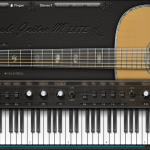 A quick overview of the Ample Guitar M lite